









How Pollo AI Can Help You Create Campaign Visuals Without a Photo Shoot
Creating images from a short text description no longer requires professional design skills. With Pollo AI’s image generator, you can describe a subject, style, setting, or mood, then turn those instructions into campaign-ready visuals in seconds. In this tutorial, you will learn how to use Pollo AI to create campaign visuals without a traditional photo shoot.
What You Can Create with an AI Image Generator?
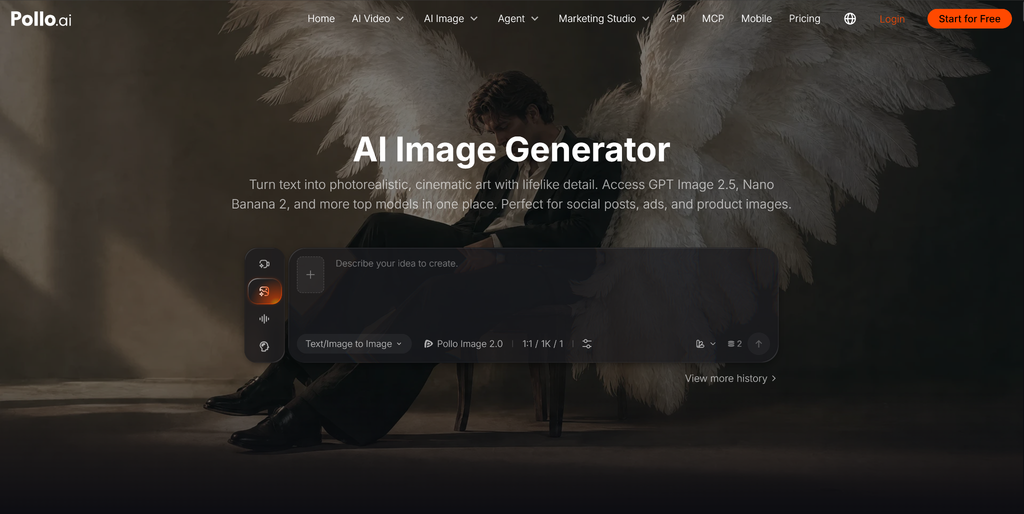
An AI image generator turns written ideas into visuals. It can support a wide range of creative projects. You can use AI to produce illustrations, create business card images, generate product photos, social media graphics, etc. It is also helpful for exploring different styles and compositions before developing a final design.
Pollo AI’s image generator brings multiple image models and specialized creative workflows into one platform, making it easier to work on different projects without switching between tools.
Step 1: Open Pollo AI’s AI Image Generator
Start by opening the Pollo AI image generator.
You are able to enter a text prompt, select an image model, choose an aspect ratio, upload a reference image, and adjust other settings. A square image may work well for an Instagram post, while a landscape image may be better for a blog header or YouTube thumbnail.
Your goal will guide the prompt and the settings you choose.
Step 2: Decide What You Want to Create
Describe the image you want in plain language.
For example, a social media creator may need:
A cheerful young woman holding a reusable coffee cup in a bright city café, natural lifestyle photography, warm colors, vertical composition.
Starting with the purpose helps you avoid vague prompts.
Step 3: Write a Clear Text-to-Image Prompt
Here is a simple structure:
Create a [subject] in [setting], [action or position], using [style], with [lighting or composition].
For example:
Create a glass bottle of orange juice on a kitchen counter, surrounded by fresh oranges, using bright commercial product photography, with soft natural lighting and a clean background.
You can add details about color, camera angle, season, clothing, or atmosphere when they matter. Keep the prompt focused. A long prompt is not automatically a better prompt.
Step 4: Choose a Visual Style
The same subject can look completely different depending on the style you request.
For marketing content, choose a style that matches the brand. A luxury product may need restrained lighting and a clean composition. A playful social media campaign may work better with brighter colors and more expressive poses.
Step 5: Select the Image Model
Pollo AI provides access to multiple image models. Different models may produce different results in terms of style, detail, composition, and prompt interpretation.
When choosing a model, think about the task:
- Use a photorealistic model for product shots and lifestyle visuals.
- Use an illustration-focused model for characters, posters, and drawings.
- Use a model that handles text or layouts well when creating designs.
- Try more than one model when you are unsure which style fits the project.
Step 6: Generate the First Image
Once your prompt and settings are ready, generate the image. The first result may not be perfect.
Check:
- Is the main subject correct?
- Is the composition suitable?
- Does the style match the prompt?
- Are the colors appropriate?
- Are important product details visible?
- Is there enough space for text?
- Does the image fit the intended platform?
Step 8: Improve the Result with Focused Changes
If the first image is close but not right, make one change at a time. For example, instead of rewriting everything, try:
Keep the same product and composition, but use a brighter background and softer daylight.
Or:
Keep the character design, but change the setting to a modern office and use a vertical composition.
Focused changes make it easier to understand what improves the result.
Practical Use Cases
Creative Projects
Bloggers can use an AI image generator to create article headers, illustrations, and supporting visuals. Artists, writers, and creators can use text-to-image tools to explore characters, settings, and visual ideas.
Social Media
You can create image concepts for Instagram posts, Pinterest graphics, Stories, and campaign announcements. Adjust the aspect ratio and composition for the platform you plan to use.
Marketing
Marketers can generate early campaign concepts, product scenes, promotional images, and ad variations. These visuals can help teams test ideas before producing final assets.
E-Commerce
An AI photo generator can help create lifestyle scenes around a product. Use clear product references and review the result carefully to make sure the product remains accurate.
Final Thoughts
Pollo AI makes it easier to turn written ideas into useful images for content creation, social media, marketing, and e-commerce. Start with a clear purpose, describe the most important visual details, choose a suitable model and format, then refine the result through focused changes.
Ready to create your own visuals? Try Pollo AI and start turning your ideas into images today.