


















Why Your Google Business Profile Decides If Customers Choose You or a Competitor
Quick answer: Small and multi-location businesses grow local visibility by combining three things: consistent Google Business Profile (GBP) posting, suburb-level rank tracking, and a technically sound website. DAXRM’s GBP post scheduler lets you plan and publish updates across all your locations from one dashboard, while its local rank tracker and site audit show exactly where you’re losing visibility and why. Together, these tools turn scattered local marketing efforts into one coordinated growth system.
If you run a dental clinic, a hearing clinic, a chemist, or any business with more than one location, you already know how much your local online presence affects your appointment book. Patients and customers don’t drive past your clinic to find you anymore. They search “dentist near me” or “hearing clinic [suburb]” on their phone, and whoever shows up first on Google Maps usually wins the call.
The problem is that building and maintaining that visibility takes more than setting up a Google Business Profile once and walking away. It requires regular posting, a clear picture of how you rank in each suburb you serve, and a website that isn’t quietly working against your rankings. Most business owners simply don’t have the time to manage all three separately.
This is where DAXRM comes in. Instead of treating GBP posting, rank tracking, and site health as three separate tasks, DAXRM brings them together in one dashboard built for exactly this kind of local growth challenge. In this guide, we’ll walk through how small and multi-location businesses can use DAXRM’s Google Business profile post scheduler, local rank tracker, and site audit tool together to build a local presence that actually converts.
What Is a Google Business Profile Post and Why Should You Care?
A Google Business Profile post is a short update that appears directly on your business listing in Google Search and Google Maps. Think of it as a mini announcement board sitting right where potential patients and customers are already looking.
Google Business Profile posts come in three formats:
- Updates: General announcements, new services, helpful tips, or business news (e.g., “Now offering Saturday hearing checks at our Parramatta clinic”)
- Events: Time-bound activities with a start and end date, like a community health day or an open house
- Offers: Promotions with discount details, redemption links, or terms, such as a new-patient exam special
What makes GBP posts different from a typical social media update is intent. The person seeing your post has usually already searched for a business like yours. They’re not scrolling passively. They’re actively deciding who to call. A relevant, current post at that exact moment can be the difference between a booked appointment and a visit to your competitor’s listing instead.
For a dental clinic, that might be a post about a new teeth-whitening service. For a hearing professional, it could be an update about free hearing screenings this month. For a chemist, it might be a reminder about flu vaccinations currently in stock. Each post is a small nudge toward action, delivered to someone who’s already looking.
The Problem: Manual GBP Posting Is Time-Consuming (Especially Across Multiple Locations)
Here’s the part nobody tells you when you set up your Google Business Profile: keeping it active is an ongoing job, not a one-off task.
If you’re running a single clinic, logging in every week to write and publish a post is manageable, if a little tedious. But if you manage three, five, or fifteen locations, that same task multiplies fast. You’re logging into each profile separately, rewriting similar content with small tweaks, checking dates, uploading images, and hoping nothing falls through the cracks during a busy week.
Most business owners admit the same thing: their GBP posting happens in bursts. They’ll post consistently for a month, then get caught up in patient care or daily operations, and the profile goes quiet for weeks. Inconsistent posting makes a profile look inactive, and that doesn’t inspire much confidence in someone deciding between you and the clinic two suburbs over.
This is a time problem, not a strategy problem. You already know posting matters. What you need is a way to do it without eating into hours you don’t have.
How DAXRM’s GBP Post Scheduler Solves This for Small and Multi-Location Businesses
DAXRM’s Google Business Profile post scheduler is built to remove the manual grind of keeping multiple profiles active, without asking you to cut corners on quality or relevance.
Schedule Updates, Offers, and Events in Advance
Instead of posting reactively, you can sit down once a month and build out your entire content calendar. Write your updates, offers, and event posts, set the publish dates, and let DAXRM take care of the rest. Planning a flu vaccine campaign for your chemist three weeks out? Schedule it now and move on with your day.
Publish to One or Multiple Locations From One Dashboard
This is the feature that changes everything for multi-location businesses. Rather than logging into five separate Google accounts to post the same update, you select your locations inside DAXRM and publish to all of them, or just the ones relevant to a specific offer, from a single screen. A dental group with clinics in three suburbs can promote a general service to every location, while still customizing posts for suburb-specific promotions.
Recurring and Automated Posts for Evergreen Content
Some content doesn’t need to be rewritten every time. Regular appointment availability, ongoing service reminders, or a recurring “Book your check-up” message can be set to post daily, weekly, fortnightly, or monthly. This keeps your profile active even during weeks when you barely have a spare moment, while still giving you the chance to review and refresh recurring posts so they stay accurate.
AI-Assisted Content Creation
If writing isn’t your thing, or you simply don’t have the time, DAXRM’s AI post writer can generate a draft based on a short topic or description. You still review and personalize it before it goes live, making sure it reflects your clinic’s voice and includes accurate details. But it removes the blank-page problem that often causes posting to stall in the first place.
Real-World Use Cases: Dental Clinics, Hearing Professionals, Chemists, and Other Local Service Businesses
Dental clinics with multiple sites can schedule a shared promotion (like a new-patient exam offer) across every location, while customizing the call-to-action link so each post sends patients to the correct clinic’s booking page.
Hearing professionals often run seasonal screening campaigns. These can be scheduled weeks ahead, with location-specific details like clinic address or appointment availability adjusted for each site before publishing.
Chemist shops dealing with high foot traffic and time-sensitive offers (vaccination reminders, seasonal health products) benefit from the offer post type, which supports discount details and redemption conditions, scheduled to go live exactly when the promotion starts.
Other local service businesses, from physiotherapy clinics to optometrists, can use the same approach: batch-create a month of content, assign it across locations, and let the scheduler manage publication while the team focuses on patients and customers.
In every case, the idea is the same. Plan once, publish everywhere relevant, and keep every profile looking active without repeating the same manual task five or ten times over.
Beyond Posting: Understanding Where You Rank Locally With DAXRM’s Local Rank Tracker
Posting consistently is only half the picture. If you don’t know where you actually rank in local search results, you’re optimizing blind.
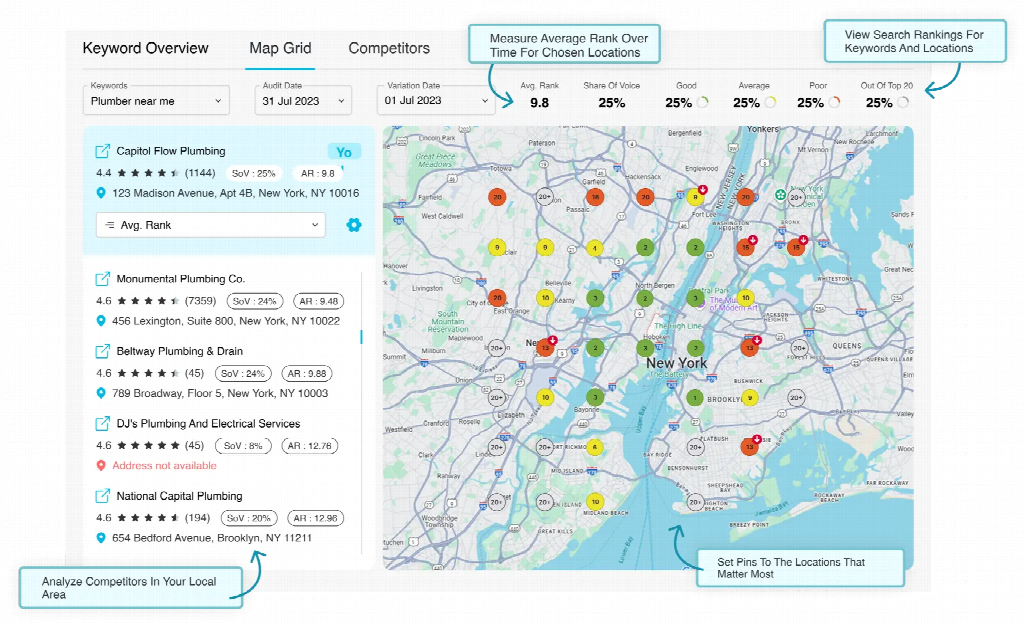
DAXRM’s local rank tracker shows you how your business performs in Google’s local results, broken down by the specific suburbs you serve. Not just a single, generalized ranking for your whole city or region.
Track Rankings Suburb by Suburb
A multi-location hearing clinic might rank well in one suburb but barely appear in Google’s local map pack for a suburb two kilometers away. Without suburb-level tracking, you’d never know. DAXRM’s local rank tracker lets you monitor performance location by location, so you can see precisely where you’re winning and where you’re invisible to nearby searchers.
Identify Gaps and Opportunities in Local Search
Once you can see rankings suburb by suburb, patterns start to emerge. Maybe your Parramatta clinic consistently ranks in the top three, but your Blacktown location never breaks into the map pack. That gap tells you where to focus, whether that means more locally relevant GBP posts, more reviews, or addressing a website issue specific to that location’s landing page.
A suburb-by-suburb tracking approach makes the most sense if you operate multiple locations and want to know which specific branches need attention, rather than relying on a single citywide average that can hide underperforming spots.
Fix What’s Holding Your Website Back With DAXRM’s Site Audit
Posting and ranking well in one suburb won’t mean much if your website itself is working against you. A slow-loading page, broken links, or missing metadata can quietly undo all the visibility you’ve built through your Google Business Profile.
Identify Technical SEO Issues
DAXRM’s site audit tool scans your website for the kinds of technical issues that often go unnoticed by business owners who aren’t looking at code or crawl reports. Things like broken links, missing alt text, slow page speed, and duplicate content. These are the factors search engines use to evaluate your site’s quality and relevance.
Understand How Website Health Impacts Local Rankings
Local search rankings aren’t decided by your Google Business Profile alone. Google also considers the health and relevance of your website when deciding who to show for a given local search. A dental clinic with glowing GBP reviews but a website full of broken booking links and slow load times may still lose ground to a competitor with a cleaner, faster site.
Running a site audit alongside your GBP posting and rank tracking closes a gap that’s easy to overlook. It tells you whether the destination you’re sending people to, through every post’s call-to-action link, is actually working the way it should.
Step-by-Step: Getting Started With DAXRM for Your Local Business
- Sign up and create your account. Register at DAXRM to access the dashboard where all your tools and integrations live.
- Create a campaign for your business or each location. DAXRM organizes work by campaign, so multi-location businesses should set up a separate campaign per location (or per client, if you’re an agency managing several businesses).
- Connect your Google Business Profile. Authorize access through your Google account and select the relevant location or locations to bring into DAXRM’s management workflow.
- Review your profile details. Before scheduling new posts, check that your business name, address, phone number, hours, and website links are accurate for each location.
- Open the GBP post scheduler. Start building your content calendar, choosing between update, event, and offer post types depending on what you’re promoting.
- Write or generate your post content. Use DAXRM’s AI post writer for a first draft if needed, then personalize it with accurate details and a clear call-to-action.
- Select locations and schedule your posts. Choose which locations should receive each post, set your publish dates, and configure any recurring schedules for evergreen content.
- Set up your local rank tracker. Add the suburbs relevant to each location so you can monitor rankings where it matters most.
- Run a site audit. Identify and prioritize fixing any technical issues that could be limiting your website’s performance in local search.
- Review performance regularly. Use DAXRM’s reporting to track which posts, keywords, and locations are driving visits, calls, and bookings, then adjust your strategy from there.
For a more detailed walkthrough of the scheduling process specifically, see DAXRM’s step-by-step guide to scheduling Google Business Profile posts.
Best Practices for GBP Posting for Local Service Businesses
- Lead with the benefit, not a generic greeting. Tell the reader immediately what’s in it for them, whether that’s a new service, an offer, or an important update, rather than opening with filler.
- Keep posts locally relevant. Reference the suburb, specific clinic, or local community wherever it fits. A shared post across five locations should still feel relevant to each one.
- Match your post type to your goal. Use events for time-bound activities, offers for promotions, and updates for everything else.
- Pair every post with the right call-to-action link. A booking-focused post should link straight to your booking page, not your homepage. And that link should be checked for each location individually.
- Establish a cadence you can actually maintain. A realistic monthly batch of scheduled posts beats an ambitious calendar that gets abandoned after a few weeks.
- Review recurring content periodically. Automated posts are only useful if they stay accurate. Check details like hours, pricing, and availability before they go live again.
- Don’t post into a weak website. Make sure the pages your posts link to are fast, functional, and free of the technical issues a site audit would catch.
Turn Local Visibility Into Booked Appointments
A consistently active Google Business Profile, suburb-level visibility into your rankings, and a website that supports your local SEO efforts rather than undermining them: these three things work together, not in isolation. A dental clinic that posts regularly but never checks its rankings suburb by suburb is working with half the information. A business with great rankings but a broken booking page is losing the conversions it worked hard to earn.
DAXRM brings GBP post scheduling, local rank tracking, and site auditing into a single dashboard so you can manage all three without juggling separate tools or logins. If you’re a small business owner or managing multiple locations and want a clearer, more coordinated approach to local growth, explore DAXRM’s Google Business Profile integration to see how it fits into your current setup.
Frequently Asked Questions
How much time does DAXRM’s GBP post scheduler actually save for multi-location businesses?
Instead of logging into each Google Business Profile separately to publish the same update, DAXRM lets you select multiple locations and schedule a post from one dashboard. For businesses managing several clinics or branches, this turns what could be hours of repetitive work into a single batch session.
Can I track how each of my individual locations ranks in local search?
Yes. DAXRM’s local rank tracker monitors rankings suburb by suburb rather than providing one blended average, so you can see exactly which locations are performing well and which ones need attention.
Why would a site audit matter if my Google Business Profile is already active?
Google considers your website’s technical health as part of how it ranks you locally. A site audit identifies issues like broken links, slow load speed, or missing metadata that could be limiting your visibility, even if your GBP activity is strong.
Is DAXRM suitable for a single-location small business, or only for multi-location brands?
Both. A single dental clinic benefits from the same post scheduling, rank tracking, and site audit features as a multi-location brand. The multi-location features simply add the ability to manage several profiles from one dashboard when needed.
What’s the risk of only focusing on GBP posting without rank tracking or site audits?
Posting alone doesn’t tell you whether your visibility is actually improving in the suburbs that matter to you, or whether your website is working against your efforts. Combining all three gives a fuller, more accurate picture of your local search performance.
How often should I post on my Google Business Profile?
Most local businesses benefit from posting at least once or twice a week. Consistency matters more than frequency. A steady stream of relevant updates signals to Google that your profile is active, which can help your ranking in local search results over time.
What types of posts work best for local service businesses like dental clinics or hearing clinics?
Offer posts work well for promotions like new-patient specials or seasonal discounts. Event posts are great for open days, community health events, or free screening days. Update posts cover everything else, such as new services, team news, or changes to your hours. Mixing all three keeps your profile varied and engaging.
Can I use DAXRM if I’m not very tech-savvy?
Yes. DAXRM is designed to be straightforward to use. The dashboard brings everything into one place, and the AI post writer helps with content creation so you don’t need to start from scratch. If you can manage a basic email or calendar app, you’ll be comfortable using DAXRM.