

















Beyond Marketing Sites: How Digital Agencies Can Add Web App Development as a Service
The request usually shows up a few weeks after a site launch. The client likes the new website, and then someone on their side asks a follow-up question. Can the agency also build the dealer portal? The quoting tool the sales team keeps asking for? A dashboard that pulls order data out of the ERP so account managers stop exporting spreadsheets every Monday?
Many marketing agencies say no, or they quietly pass the work to a freelancer and hope it holds together. Both choices leave money on the table. The client already trusts the agency with their brand, their content, and their customer experience. Logged-in tools are the next layer of that same experience, and the budgets attached to them are usually larger and longer-lasting than a website refresh.
Adding web app development still takes more than a new line on the services page. The work behaves differently from website projects, the risks are different, and the staffing question is harder. This guide walks through what changes, which projects make a good first step, how to price them, and how to staff the build without betting the agency on a hiring spree.
Why a Web App Is a Different Product Than a Website
A marketing site is mostly published content. It has pages, forms, and a CMS. Once it launches, the main ongoing work is content updates, SEO, and the occasional new landing page.
A web app holds state. Users log in, see data that belongs only to them, take actions that change records, and expect the system to remember those changes. That one difference ripples through every part of the project.
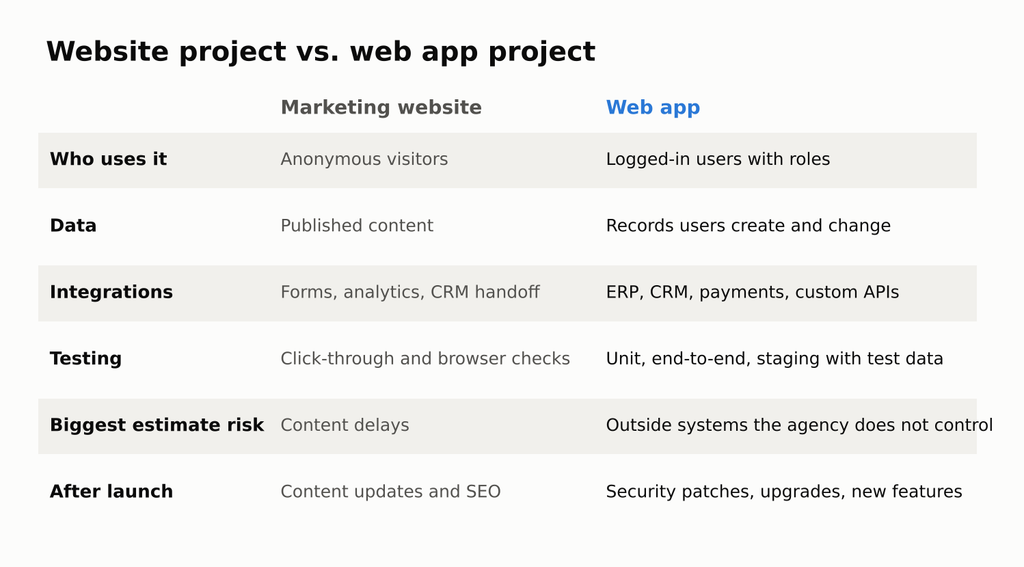
Website project vs. web app project
Here is what typically changes when an agency moves from sites to apps:
- Authentication and roles. A customer portal might need three or four user roles (customer, account manager, regional admin, super admin), each seeing different screens and data. Every role multiplies the testing work.
- Integrations. Most business apps sit on top of something that already exists: Salesforce, HubSpot, NetSuite, SAP, a payment processor, or a homegrown API built ten years ago. The integration is often the riskiest part of the estimate, because the agency does not control the other system.
- Data rules. Who can edit an order after it ships? What happens when two people change the same record at once? Websites rarely ask these questions. Apps ask them constantly.
- Testing. A site can be checked by clicking through pages. An app needs unit tests, end-to-end tests for core user flows, and a staging environment that mirrors production with realistic test data.
- An ongoing lifecycle. Frameworks release new major versions, security patches land, and the client’s business rules change. An app that nobody maintains starts breaking within a year or two.
The practical takeaway: an agency can reuse its design, UX, and project management strength, but it needs new engineering depth, new contract language, and a different way of estimating.
Which First Projects Make Sense (and Which to Avoid)
The best first app projects sit close to work the agency already does. They have a clear user, a limited number of screens, and an existing data source with a documented API.
Good first projects:
- Client or dealer portals. Logged-in areas where customers download documents, check order status, or reorder products. Heavy on UX, which plays to agency strengths.
- Internal dashboards. Read-mostly views on top of data that already lives in a CRM or ERP. Few write actions means fewer edge cases.
- Quote builders and product configurators. Common for manufacturers and B2B brands. The rules can get detailed, but the scope is easy to define on a whiteboard.
- Booking and scheduling tools. Well-understood patterns, plenty of reference products to compare against.
Projects to pass on until the team has a few launches behind it:
- Anything that stores card data directly or touches payment card compliance beyond a hosted checkout
- Apps that handle protected health information, where HIPAA rules shape the whole architecture
- Real-time collaboration tools (live cursors, multiplayer editing), which need specialized backend work
- Rewrites of a large legacy system with no documentation and no one left who knows how it works
A simple filter helps here. If the agency cannot describe every user role, every screen, and every outside system on one page after a two-hour workshop, the project is too big for a first build.
Follow the Client’s Tech Stack
Agencies tend to pick a framework based on what their own developers like. With app work, the client’s existing stack often decides it instead.
Enterprise clients are where this shows up most. Large companies in finance, insurance, logistics, healthcare, and manufacturing standardized on Angular years ago for internal tools, and many keep it for new projects so their in-house teams can maintain everything. When an agency pitches a portal for one of those clients, proposing React or Vue can turn into a long internal debate the agency does not win. Building in the stack the client’s IT team already supports removes that objection before it starts.
Angular also has some traits that suit agency delivery specifically:
- It comes with the essentials built in. Routing, forms, HTTP handling, and testing tools ship with the framework, so two Angular projects look similar. That makes handoffs between developers, and back to the client’s own team, much easier.
- It is built on TypeScript. Strict typing catches a class of bugs before code ships, which matters on apps with complex data.
- It has a published support calendar. As of Angular 22 (released June 2026), the Angular team moved to one major release per year, with each version getting 12 months of active support and 12 months of long-term support (LTS), 24 months in total.
That calendar is worth understanding before signing a contract, because it creates predictable maintenance work. Angular 20 reaches the end of LTS in late November 2026. Angular 21 follows in June 2027. Any client app still running those versions will need an upgrade to stay on a supported, patched release.
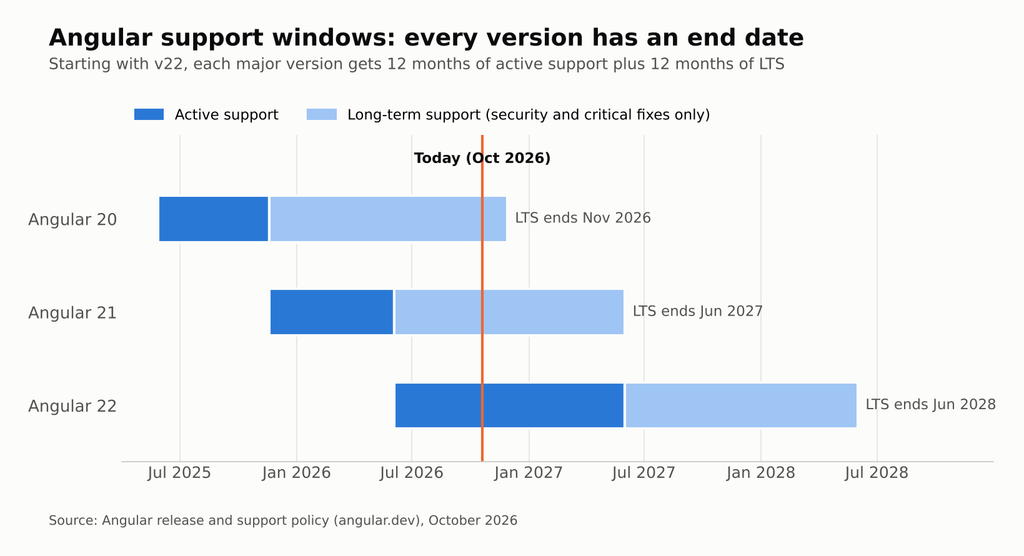
Angular support windows for versions 20, 21, and 22
For an agency, that timeline opens a sales conversation. A portal built today on Angular 22 has a known upgrade window in mid-2027 and again in mid-2028. Those upgrades can be written into a support retainer from day one.
Scoping and Pricing App Work Without Getting Burned
Fixed-price website quotes work because the agency has built dozens of similar sites. App projects carry more unknowns, so a single fixed bid for the whole build is where most agencies get hurt. A phased structure spreads that risk more fairly.

A three-phase model for pricing web app work
Phase 1: Paid Discovery (Fixed Fee, 2 to 4 Weeks)
Discovery produces the documents the build depends on: user roles, a screen inventory, clickable wireframes or prototypes, an integration map with API access confirmed, and a prioritized feature list. It also flags the scary parts early, such as an ERP that has no API or a “simple” import that turns out to involve 40 spreadsheet formats.
Charging for discovery matters. Free discovery trains clients to treat the most important phase as sales overhead, and it leaves the agency estimating a build it does not fully understand.
Phase 2: Build (Sprint-Based or Capped Time and Materials)
Once discovery is done, the build can be priced by sprint. A common setup is two-week sprints with a fixed team, a demo at the end of each one, and a written change process for anything outside the agreed feature list. Some clients need a single number for budget approval. In that case a capped time-and-materials contract, with a clear list of what is in and out of scope, gives them the ceiling they need without forcing the agency to absorb every surprise.
A useful estimating habit: count the work in three units instead of pages. Roles times screens times integrations. A portal with 3 roles, 18 screens, and 2 integrations is a very different project from one with 1 role, 8 screens, and no integrations, even if both “look like a dashboard” in the sales call.
Phase 3: Support Retainer (Monthly)
This is where app work starts paying off in a way website projects rarely do. A support retainer covers security patches, framework and dependency upgrades, uptime monitoring, bug fixes, and a set number of hours for small improvements. Tie it directly to the framework’s support calendar so the client can see why the retainer exists and when the bigger upgrade months will land.
The Staffing Question: Build, Borrow, or Partner
Most agencies stall at this step. Design and front-end skills only get a team part of the way. App work needs engineers who understand state management, API design, authentication, automated testing, and deployment pipelines. And on enterprise accounts, it usually needs those engineers to know the specific framework the client uses.
There are four realistic ways to get that capacity.
1. Hire in-house. This gives the most control and builds long-term value in the agency. It is also the slowest and riskiest option for a first project. Senior engineers with deep Angular experience are in demand, recruiting takes months, and an agency with one app client cannot always keep a full-time engineer busy between projects. One developer also means one point of failure.
2. Use freelancers. Freelancers are fast to bring on and work well for short, well-defined tasks. They are a weak fit for apps that need a year or more of maintenance. If the freelancer takes another contract, the agency is left supporting code nobody on staff understands.
3. White-label development shop. A white-label partner builds under the agency’s brand. This can work well, but the agency often loses visibility into who is writing the code and how it is structured. When the relationship ends, knowledge leaves with it.
4. Dedicated team through a staffing partner. Here the agency adds full-time developers who work only on its projects, inside its own tools and process, without hiring them directly. The agency keeps the client relationship, design, UX, and project management. The dedicated developers handle the engineering. For an agency that has just won an enterprise account built on Angular, a dedicated setup such as Full Scale’s Angular team can provide experienced framework developers in weeks instead of the months a local search can take, while the agency stays the client’s single point of contact.
Whichever route an agency takes, a few questions sort strong partners from weak ones:
- Will the same developers stay on the project for its full life, or rotate between clients?
- Can the developers join the agency’s Slack, standups, and sprint reviews directly?
- Does the code live in a repository the agency (or its client) owns from the first commit?
- How does the partner handle a developer who is not working out?
- Have the developers shipped apps in the client’s framework, or are they learning on this project?
Delivery Habits That Keep the Agency in Control
Whether engineering is in-house or partnered, the agency is the name on the contract. A handful of habits keep quality high and protect the relationship.
Own the repository. Create the Git repository under the client’s account or the agency’s account on day one, never a contractor’s personal account. Access can be granted and removed. Ownership is much harder to recover.
Set up CI/CD before the first feature. Automated builds, tests, and deployments to a staging environment should exist before anyone writes a login screen. Tools like GitHub Actions, GitLab CI, or Azure DevOps all handle this well. It prevents “it works on my machine” problems and makes every demo reproducible.
Require code review on every change. No code reaches the main branch without a second developer approving it. This keeps quality consistent and spreads knowledge so the project never depends on one person.
Demo every sprint, to the client. Short, regular demos catch misunderstandings while they are cheap to fix. They also keep the agency’s account team, not the engineers, as the client’s main contact.
Write the handoff document as the project runs. Architecture notes, environment setup, deployment steps, and a list of third-party services with renewal dates. Clients that later bring app work in-house will remember which agency handed them a clean package.
Put a version policy in writing. State which Angular (or other framework) version the app ships on, when the next upgrade is expected, and what the support retainer covers. This turns the framework’s release calendar into a planned line item instead of a surprise invoice.
How to Tell If the Agency Is Ready
Not every agency should add app development this year. A quick readiness check:
- At least two current clients have asked for portals, dashboards, or internal tools in the last 12 months
- The agency already runs projects in sprints, or is willing to start
- The team has someone who can act as a technical lead, either on staff or through a partner
- Contracts can be updated to include paid discovery, change requests, and support retainers
- The agency is comfortable owning hosting, monitoring, and security patching, or has a partner who will
- The sales team can explain the difference between a website quote and an app quote without apologizing for the price
If most of those boxes are checked, the next step is small: pick one existing client with a clear, limited app need, run a paid discovery, and use that project to build the playbook.
The Payoff for Agencies That Get This Right
Website projects tend to end with a launch and a slow fade into small monthly updates. App projects keep going. A well-built client portal creates a backlog of improvements, a scheduled upgrade every year, and a reason for the client to talk to the agency every month.
It also changes how the client sees the agency. An agency that only builds the marketing site sits in the marketing budget. One that builds the tools sales, operations, and customers use every day moves closer to the center of the business, and that is a much harder relationship for a competitor to take away.
Winning this work does not require the biggest engineering department. It takes careful scoping, respect for the client’s existing stack, phased pricing, and the right engineers on the project from the first sprint.